Container image caching with Harbor
The container images composing the MoAI Inference Framework are distributed through Amazon ECR. Although this approach works well in general, fetching images from a remote registry during deployment and scaling of inference environments may incur substantial delays.
This document explains how to build a local image registry with Harbor, automatically cache container images in Moreh's upstream Amazon ECR registry, and use them when deploying production inference environments. It covers the following high-level flow.
- Installing Harbor and configuring HTTP/HTTPS access.
- Registering Moreh's Amazon ECR as a registry endpoint in Harbor.
- Creating a Harbor project to cache or replicate images.
- Configuring Kubernetes nodes to pull images from Harbor instead of ECR.
Install Harbor
Refer to Harbor Installation and Configuration for more details.
Pull a chart from the Harbor Helm repository.
helm repo add harbor https://helm.goharbor.io
helm repo update harbor
Decide whether to configure Harbor over HTTP (insecure but simple) or HTTPS, depending on your environment. Then, deploy Harbor using the following command. If you choose HTTPS, the externalURL must start with https:// instead of http://. You also need to replace <password> and <storageClass> with your own values.
helm upgrade -i harbor harbor/harbor \
    --version 1.18.2 \
    -n harbor \
    --create-namespace \
    --set harborAdminPassword <password> \
    --set persistence.persistentVolumeClaim.registry.storageClass <storageClass> \
    --set persistence.persistentVolumeClaim.jobservice.jobLog.storageClass <storageClass> \
    --set persistence.persistentVolumeClaim.database.storageClass <storageClass> \
    --set persistence.persistentVolumeClaim.redis.storageClass <storageClass> \
    --set persistence.persistentVolumeClaim.trivy.storageClass <storageClass> \
    --set externalURL http://harbor.harbor.svc.cluster.local \
    --set expose.tls.enabled true \
    --set expose.tls.certSource secret \
    --set expose.tls.secret.secretName harbor-tls
If you want to modify additional configurations beyond those specified in the command above to better fit your cluster environment, you can customize and use the values.yaml file provided by Harbor.
Then, apply additional configuration depending on whether you are using HTTP or HTTPS.
HTTP/HTTPS configuration
Harbor can be exposed over HTTP(insecure) or HTTPS. Choose one based on your environment.
- HTTP (Default)
- HTTPS
This configuration must be applied to all nodes.
If you want to use HTTP, your container runtime must allow an insecure registry for the Harbor endpoint; otherwise image pulls may fail.
Configure containerd
Configure the registry as insecure:
[plugins]
...
  [plugins."io.containerd.cri.v1.images".registry]
    config_path = "/etc/containerd/certs.d"
Create a registry host file.
mkdir -p /etc/containerd/certs.d/harbor.harbor.svc.cluster.local:80
cat > /etc/containerd/certs.d/harbor.harbor.svc.cluster.local:80/hosts.toml << 'EOF'
server = "https://harbor.harbor.svc.cluster.local:80"

[host."http://harbor.harbor.svc.cluster.local:80"]
  capabilities = ["pull","resolve","push"]
  skip_verify = true
  override_path = false
EOF
Restart containerd
sudo systemctl restart containerd
Configure TLS for Harbor using either:
- a public certificate, or
- an internal CA / self-signed certificate (ensure the CA is trusted by clients).
If you expose Harbor with Ingress, you can terminate TLS at the ingress controller and route traffic to Harbor services. If you use a self-signed certificate, make sure Kubernetes nodes (container runtime) trust the CA certificate; otherwise image pulls may fail with x509 errors.
In this document we use ClusterIP and issue certificates with cert-manager.
If you use this approach, make sure to account for certificate expiration.
Following manifest creates root CA(harbor-ca) and TLS certificate(harbor-tls).
---
apiVersion: cert-manager.io/v1
kind: Issuer
metadata:
  name: harbor-selfsigned
  namespace: harbor
spec:
  selfSigned: {}

---
apiVersion: cert-manager.io/v1
kind: Certificate
metadata:
  name: harbor-ca
  namespace: harbor
spec:
  isCA: true
  commonName: harbor-ca
  secretName: harbor-ca
  privateKey:
    algorithm: RSA
    size: 2048
  issuerRef:
    name: harbor-selfsigned
    kind: Issuer

---
apiVersion: cert-manager.io/v1
kind: Issuer
metadata:
  name: harbor-ca-issuer
  namespace: harbor
spec:
  ca:
    secretName: harbor-ca

---
apiVersion: cert-manager.io/v1
kind: Certificate
metadata:
  name: harbor-tls
  namespace: harbor
spec:
  secretName: harbor-tls
  commonName: harbor.harbor.svc.cluster.local
  dnsNames:
    - harbor.harbor.svc.cluster.local
    - harbor
    - harbor.harbor
  privateKey:
    algorithm: RSA
    size: 2048
  issuerRef:
    name: harbor-ca-issuer
    kind: Issuer
Then create certificates with following command.
kubectl apply -f harbor-tls.yaml
Confirm resources are ready.
kubectl -n harbor get issuer,certificate
kubectl -n harbor describe certificate harbor-tls
kubectl -n harbor get secret harbor-tls
This configuration must be applied to all nodes.
Extract the root CA from the secret and add it to containerd's trust store.
kubectl get secret -n harbor harbor-ca -o jsonpath='{.data.ca\.crt}' | base64 -d > harbor-ca.crt
mkdir -p /etc/containerd/certs.d/harbor.harbor.svc.cluster.local:443
cp harbor-ca.crt /etc/containerd/certs.d/harbor.harbor.svc.cluster.local:443/ca.crt
Create a registry host file
cat > /etc/containerd/certs.d/harbor.harbor.svc.cluster.local:443/hosts.toml << 'EOF'
server = "https://harbor.harbor.svc.cluster.local:443"

[host."https://harbor.harbor.svc.cluster.local:443"]
  capabilities = ["pull","resolve","push"]
  ca = "/etc/containerd/certs.d/harbor.harbor.svc.cluster.local:443/ca.crt"
  override_path = false
EOF
Restart containerd
sudo systemctl restart containerd
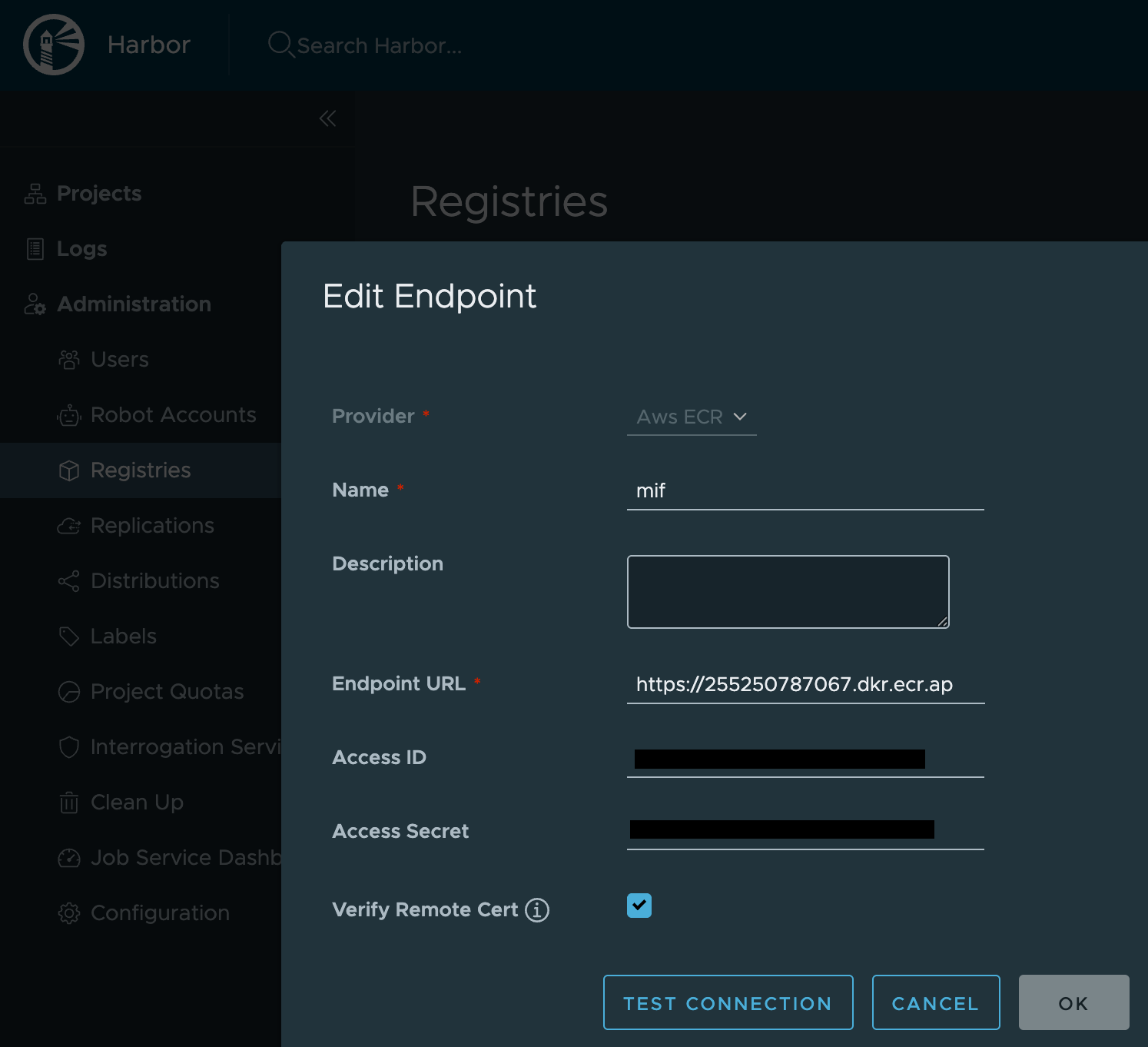
Register Moreh ECR endpoint
Administration > Registries > New Endpoint
- Provider: AWS ECR
- Endpoint URL:
https://255250787067.dkr.ecr.ap-northeast-2.amazonaws.com - Please refer to moai-inference-framework for the
Access IDandAccess Secret.
Create Harbor project
- Proxy cache (Default)
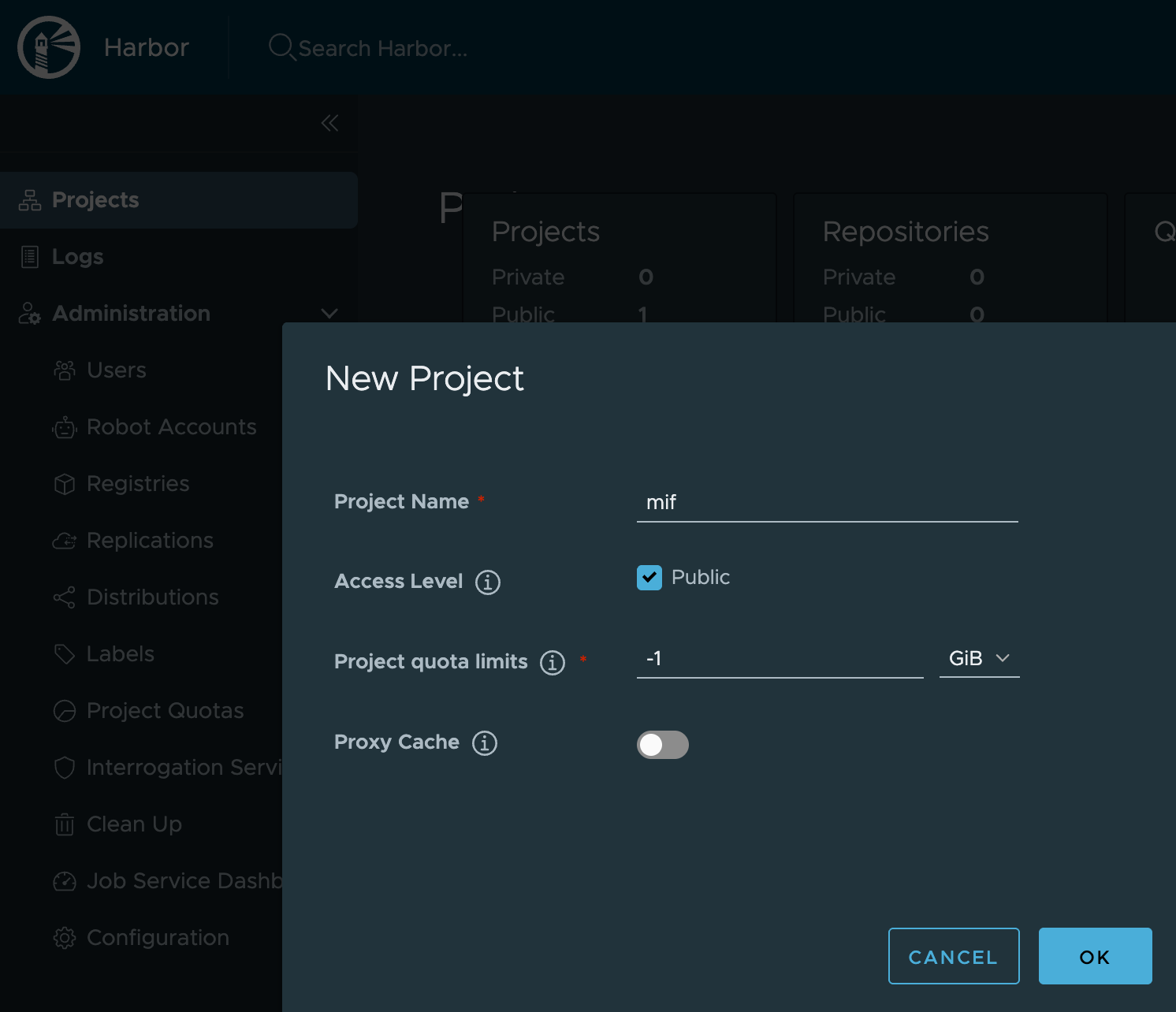
- Replication
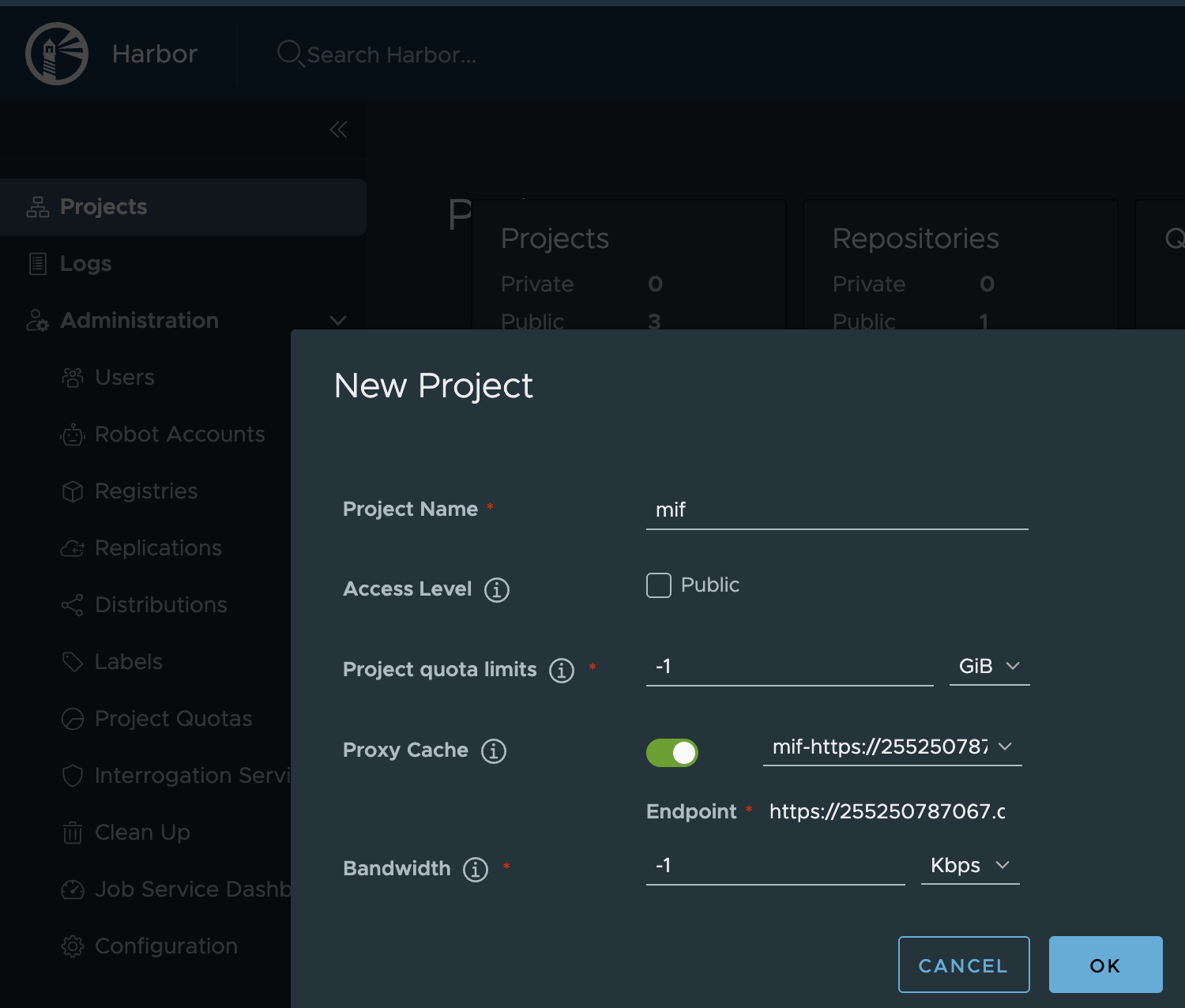
This approach makes the container runtime pull images through Harbor as a proxy (pull-through cache). Images are cached on demand when they are first pulled.
Create a project
Create a new Harbor project and enable Proxy cache.
Create a project
Projects > New Project
Create a Harbor replication rule
Administration > Replications > New Replication Rule
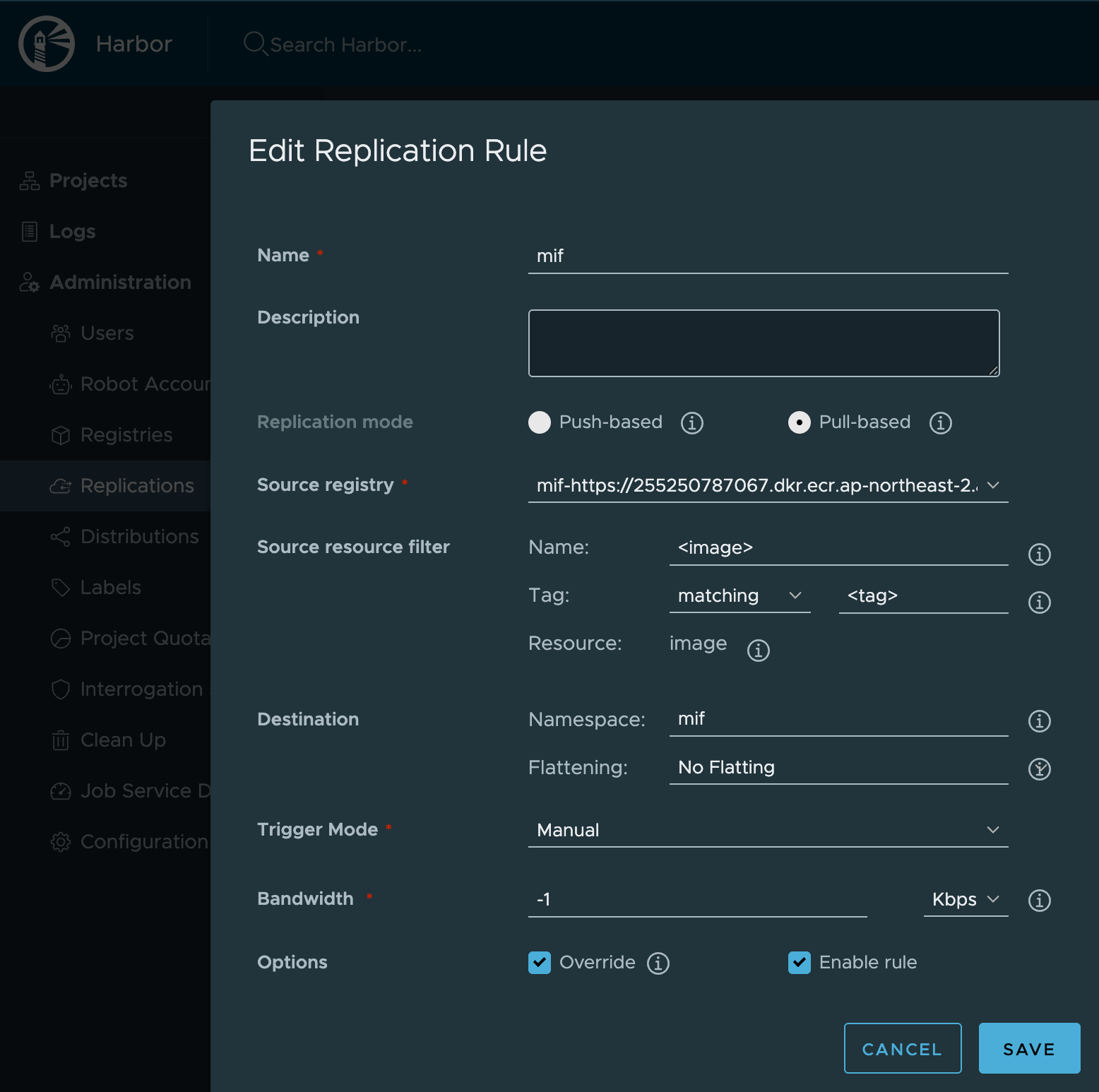
Replication rule must be triggered to mirror images from ECR into Harbor project.
Configure mirror or rewrite image path
- Containerd mirror (Default)
- Kyverno rewrite
This configuration must be applied to all nodes.
On every node that may pull images, create the directory and hosts.toml file below.
sudo mkdir -p /etc/containerd/certs.d/255250787067.dkr.ecr.ap-northeast-2.amazonaws.com
sudo tee /etc/containerd/certs.d/255250787067.dkr.ecr.ap-northeast-2.amazonaws.com/hosts.toml >/dev/null <<'EOF'
server = "https://255250787067.dkr.ecr.ap-northeast-2.amazonaws.com"

# [host."https://harbor.harbor.svc.cluster.local:443/v2/mif"]
[host."http://harbor.harbor.svc.cluster.local:80/v2/mif"]
  capabilities = ["pull","resolve"]
  skip_verify = true
  override_path = false
EOF
Restart containerd
sudo systemctl restart containerd
For verifying, Pull an image once from any node configured and then confirm the image cached under the proxy cache project(mif) in Harbor web UI.
sudo crictl pull \
  255250787067.dkr.ecr.ap-northeast-2.amazonaws.com/quickstart/<image>:<tag>
Kyverno is Kubernetes-native policy engine that enforces guardrails and automates operations using policy-as-code (YAML). It runs as a dynamic admission controller, evaluating requests sent to the Kubernetes API server and can validate or mutate resources at admission time.
Kyverno can be used to rewrite container image references so that workloads which originally point to Amazon ECR will instead pull images from your local Harbor registry (after you mirror the images to Harbor).
Deploy kyverno using the following command:
kubectl create -f https://github.com/kyverno/kyverno/releases/latest/download/install.yaml
apiVersion: kyverno.io/v1
kind: ClusterPolicy
metadata:
  name: ecr-rewrite-registry
spec:
  admission: true
  background: true
  emitWarning: false
  rules:
    - name: ecr-rewrite-registry-container
      match:
        any:
          - resources:
              kinds:
                - Pod
      mutate:
        foreach:
          - list: request.object.spec.containers
            patchStrategicMerge:
              spec:
                containers: # set registry port as your setup (80 or 443)
                  - image: "{{ regex_replace_all_literal('255250787067.dkr.ecr.ap-northeast-2.amazonaws.com', '{{ element.image }}', 'harbor.harbor.svc.cluster.local:<yourPort>/mif') }}"
                    name: '{{ element.name }}'
      skipBackgroundRequests: true
    - name: ecr-rewrite-registry-init-container
      match:
        any:
          - resources:
              kinds:
                - Pod
      mutate:
        foreach:
          - list: request.object.spec.initContainers
            patchStrategicMerge:
              spec:
                initContainers: # set registry port as your setup (80 or 443)
                  - image: "{{ regex_replace_all_literal('255250787067.dkr.ecr.ap-northeast-2.amazonaws.com', '{{ element.image }}', 'harbor.harbor.svc.cluster.local:<yourPort>/mif') }}"
                    name: '{{ element.name }}'
      preconditions:
        all:
          - key: '{{ request.object.spec.initContainers[] || `[]` | length(@) }}'
            operator: GreaterThanOrEquals
            value: 1
      skipBackgroundRequests: true
  validationFailureAction: Audit
Create a ClusterPolicy:
kubectl apply -f clusterpolicy.yaml
If you want to check policy status, then follow this command.
kubectl get clusterpolicy
NAME                   ADMISSION   BACKGROUND   READY   AGE   MESSAGE
ecr-rewrite-registry   true        true         True    19h   Ready
Disable ECR token refresher
When pulling images through Harbor instead of directly from Amazon ECR, the ecrTokenRefresher CronJob is no longer needed. Harbor handles ECR authentication on its own using the registry endpoint credentials configured earlier. Disable it in your values file:
ecrTokenRefresher:
  enabled: false